The Mad Lions ROARVERTER
Get Roarverter

Convert and compress · The Mad Lions Lab · Experiment 08

ROARVERTERbeta

Every format, a smaller file. Pictures, videos and sound, converted and compressed on your own computer: drop them in, choose how small, and they are ready next to the originals.

Free · Mac and Windows · nothing is uploaded, the originals stay as they are

01 · Only here

Three things only Roarverter does.

Why a website that shrinks one file at a time is not enough for a shoot.

01

A size, not a guess.

Type 25 MB, for an email, a festival form or Discord, and Roarverter works out the bitrate from the video's length and leaves room for the sound. No trying three times to get under the limit.

Target in MBH.264 · H.265 · AV1Or a quality
TARGET SIZE
25MB
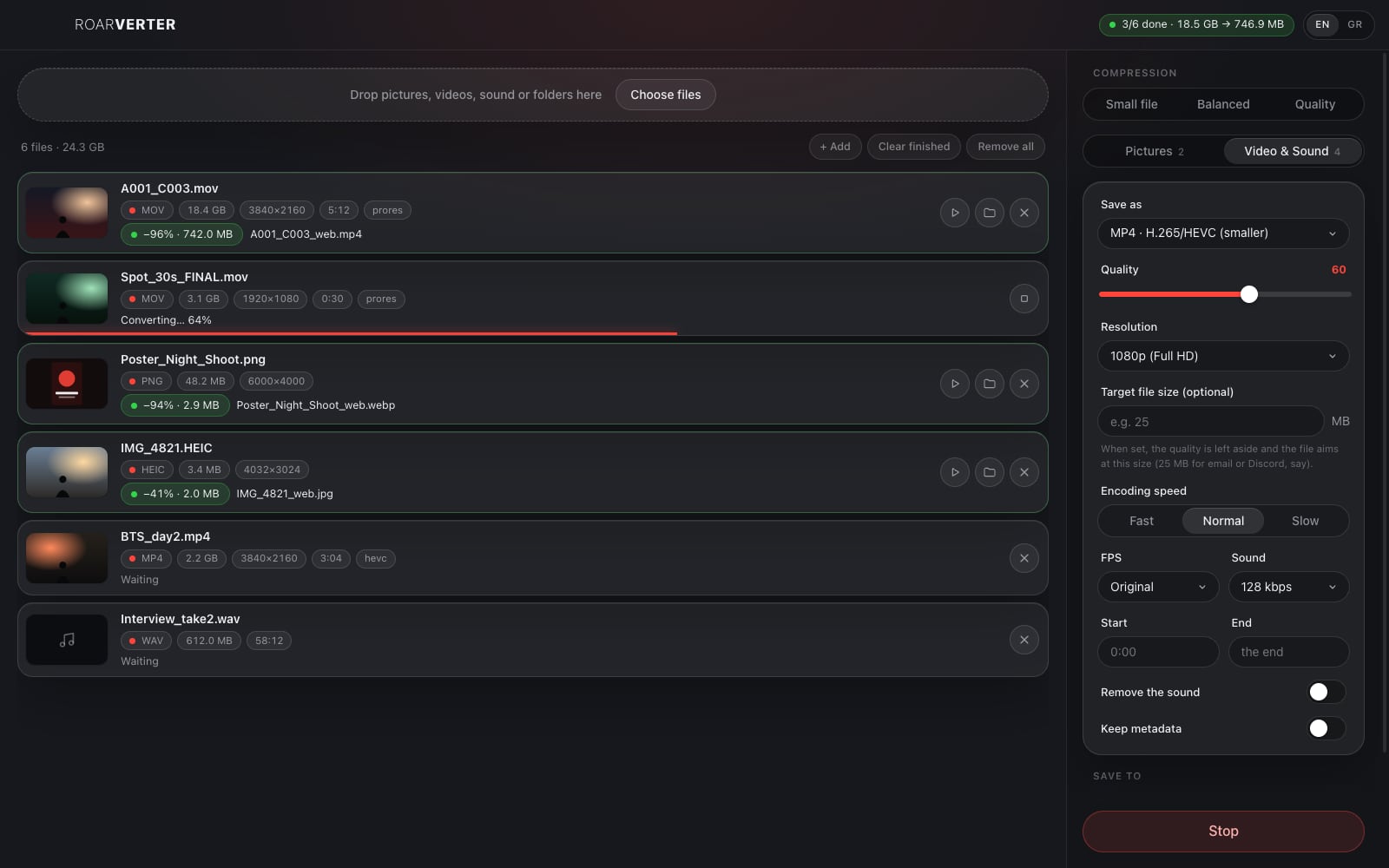
Teaser_60s.mov2.4 GB → 24.6 MB
02

Every format, one window.

Photos from the phone, the poster, the master, the BTS, the interview's sound: drop them all at once. Pictures, video, sound only, a GIF from a clip, or a single still at any moment.

PicturesVideoSoundGIF and stills
HEIC→JPG−41%
PNG→WebP−94%
ProRes→H.265−96%
WAV→MP3−89%
03

Nothing leaves the computer.

No upload, no account, no queue on a server: unreleased footage stays with you. The original is never touched; the new file is saved next to it, or in a folder you choose.

No uploadThe original staysWorks offline
A001_C003.movoriginal
A001_C003_converted.mp4742 MB
Same folderConvert

02 · For the shoot

Made for a shoot's files.

The card, the stills, the edit, the deliveries: all at once.

Where from

Drop whole folders.

One file, a few, or a folder with everything inside: Roarverter finds the pictures, videos and sound in it. Pictures go three at a time, videos one by one, with the progress of each.

Upright too

1080p, either way up.

The resolution is the short side, so a 9:16 video for Reels comes out 1080 wide, not squeezed. Pictures never grow bigger than they were.

Three presets

Small, balanced, or quality.

One tap sets everything; or set the quality, the size, the frame rate, the codec and the speed yourself. Roarverter remembers what you chose.

For the edit

ProRes when it has to be.

The phone's HEVC or a web download into ProRes for the timeline, a still for the poster, the sound of an interview as WAV for the mix.

Roarverter icon

03 · Everything

And the rest.

Roarverter, briefly.

01Pictures in

JPG, PNG, WebP, AVIF, HEIC, TIFF, GIF, BMP, SVG, TGA and more.

02Pictures out

JPG, PNG, WebP, AVIF, TIFF, GIF, BMP, and ICO for an icon.

03Video out

MP4 in H.264, H.265 or AV1, WebM, MOV with H.264 or ProRes, MKV, AVI.

04A start and an end

Keep only a part of the clip: from 0:12 to 0:45, say.

05A still

One frame as JPG or PNG, at the moment you say.

06The sound only

MP3, M4A, WAV, FLAC or OGG out of any video.

07Without the sound

One switch takes the sound off a video.

08EXIF, or not

Keep the camera’s data, or leave it out for the web.

09Lossless

At quality 100, PNG, WebP and AVIF lose nothing.

10Updates itself

A new version downloads in the background; one tap to restart.

11English and Greek

The app speaks both; choose at the top.

12Free

No subscription, no ads, no watermark.
04 · Private

Your files, untouched.

Roarverter only ever writes new files. It reads the originals and leaves them where they are.

On your computer

Every conversion runs on your computer. No account, no server, nothing uploaded, no internet needed.

The original stays

The new file gets its own name, _converted by default, and a number if that name is taken. Nothing is written over.

Stop any time

Stop one file or all of them; what was half made is left out.

Your metadata, your call

Camera data and location are left out by default; one switch keeps them.

05 · Download

Get Roarverter.

Free, and in beta: an experiment of The Mad Lions Lab that we use for our own deliveries.

Mac

For Macs with Apple chips (M1 and newer). Download Older Mac with Intel? This one

Windows

Windows 10 and 11. Download

It updates itself. The Mac and Windows apps fetch new versions on their own and ask for a quick restart.

First time on a Mac? The app is not signed by Apple yet: right-click Roarverter in Applications and choose Open, or press Open Anyway in System Settings › Privacy & Security. On Windows: More info › Run anyway.

06 · Questions

Good to know.

Is Roarverter free?

Yes. No subscription, no ads, no watermark.
How much smaller does a file get?

It depends on the file. A ProRes master to H.265 is often 90 to 97% smaller; a PNG to WebP 70 to 95%; a phone photo to JPG about 40%. Each file in the list shows how much it saved.

Does the target size land exactly?

Close to it: the bitrate comes from the length in one pass, and a little is left for the container, so a 25 MB target comes out a little under. Very short or very still clips can come out smaller still.

Which format for Instagram, email or the web?

MP4 with H.264 plays everywhere; H.265 is about half the size and plays on every phone and recent computer. For pictures on a website, WebP or AVIF.

Does it work on HEIC photos from an iPhone?

Yes on a Mac. On Windows some HEIC photos may not open yet; save them as JPG on the phone, or convert them on a Mac.

Do I need the internet?

No. Only to download the app and its updates; every conversion runs on your computer.

Contact

Ideas for the next version?

lab@themadlions.com
