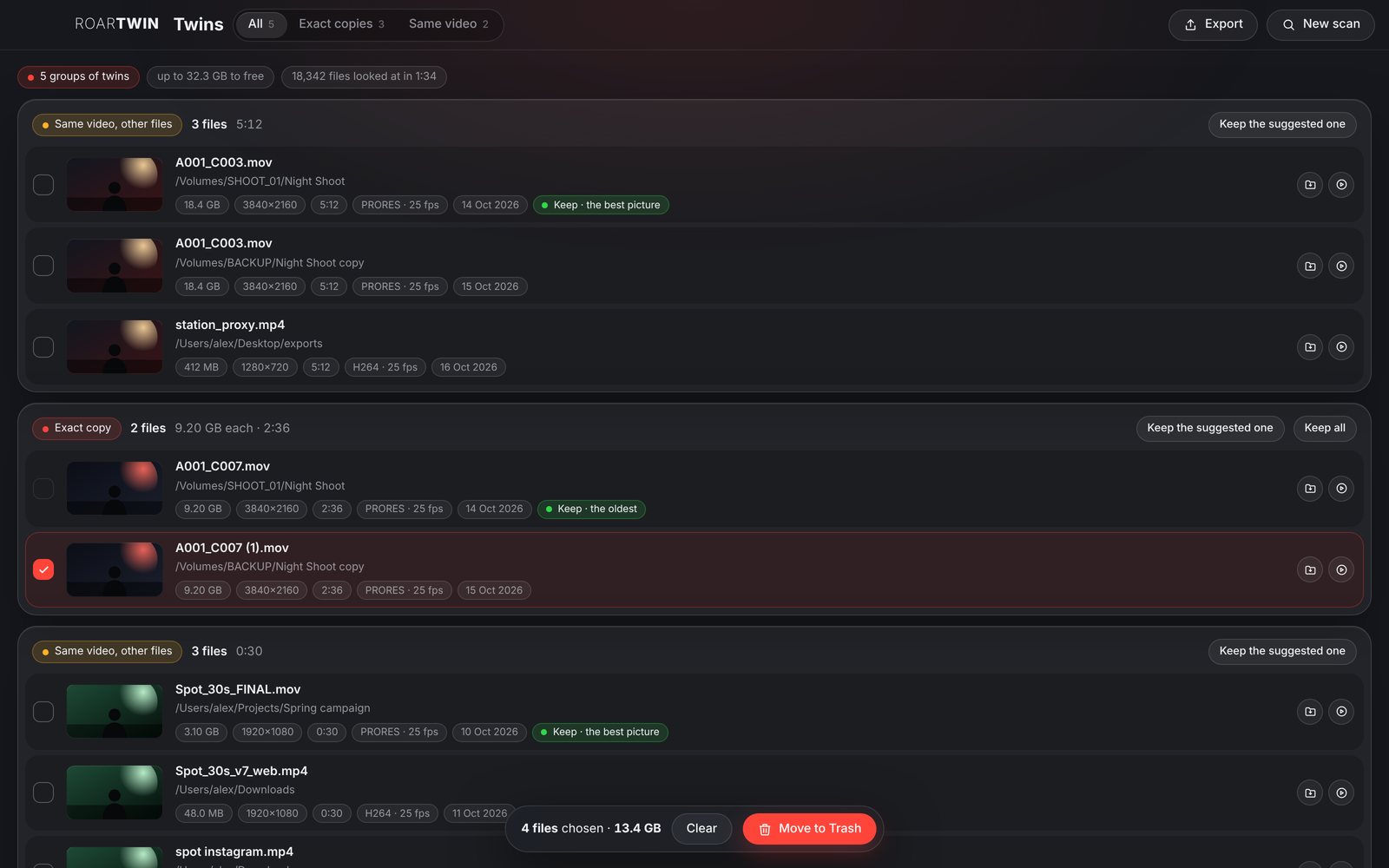
Not fooled by names.
A copy renamed is still found: RoarTwin compares what is inside, the size, then the bytes, then a fingerprint of the whole file. And two clips that only share a name, A001_C003.MOV from two shoots, are never taken for twins.
ROARTWIN
Duplicates · The Mad Lions Lab · Experiment 07
Find the twins. The same file twice, whatever its name, and the same video in another file, in another size, codec or format, so you keep one and free the space.
Free · Mac and Windows · nothing is deleted, only moved to the Trash
01 · Only here
Why a cleaner that looks at names is not enough for a shoot's drives.
A copy renamed is still found: RoarTwin compares what is inside, the size, then the bytes, then a fingerprint of the whole file. And two clips that only share a name, A001_C003.MOV from two shoots, are never taken for twins.
The master, the proxy, the web export, the one for Instagram: RoarTwin reads each video's length, size and codec, then compares the pictures, nine frames through the clip. Re-encoded, resized or in another container, it is the same video.
RoarTwin never deletes: what you choose goes to the computer's Trash, and one file of each group always stays where it is. Exact copies come chosen for you; the same video in other files waits for your call.
02 · For the drives
The card, the backup, the edit, the exports: all at once.
One folder, a few, or whole disks at once: drop them on the window or choose them. The system's folders, the Trash and libraries like Photos or Final Cut are left alone.
For the same video RoarTwin suggests the biggest picture, then the most data. For exact copies, the oldest, the original. One click keeps the suggested one, or choose yourself.
Every video and photo with a preview, its folder, size, picture size, length, codec, frame rate and date, side by side. Show it in Finder or Explorer, or open it, from the list.
Save every group as a CSV that Excel and Numbers open: what is a twin of what, the suggested one, what you chose. Decide together before anything moves.
03 · Everything
RoarTwin, briefly.
Videos, photos, sound, projects, documents: exact copies of anything. Or only videos, if you like.
MOV, MP4, MXF, MKV, AVI, MTS, WebM and more: ffmpeg comes inside the app.
Flat pictures, black or one colour, say nothing and are left out of the comparison.
Leave out files under 1 MB, 100 MB or 1 GB, to look only at what takes space.
The same folder twice, a folder inside another, a hard link: each file counts once.
A scan can be stopped; the computer does not fall asleep in the middle of a long one.
Filter the results: all, exact copies, or the same video in other files.
How much each group frees, and the total, before you move anything.
Add folders ⌘O, a new scan ⌘N, export the list ⌘E.
A new version downloads in the background; one tap to restart.
Nothing leaves your computer: no account, no upload, no internet needed to scan.
No subscription, no ads.
04 · Safe
RoarTwin only reads until you choose. Then it moves, never deletes.
Chosen files go to the computer's Trash, where they wait until you empty it.
You cannot choose every file of a group: the last one stays, checked twice, on the page and in the app.
The scan runs on your computer. No account, no server, nothing uploaded.
Until you press Move to Trash, RoarTwin only reads: no file is changed, renamed or touched.
05 · Download
Free, and in beta: an experiment of The Mad Lions Lab that we use on our own shoots.
It updates itself. The Mac and Windows apps fetch new versions on their own and ask for a quick restart.
First time on a Mac? The app is not signed by Apple yet: right-click RoarTwin in Applications and choose Open, or press Open Anyway in System Settings › Privacy & Security. On Windows: More info › Run anyway.
06 · Questions
Yes. No subscription, no ads.
First by their length, within a second. Then by their pictures: nine frames, from 10% to 90% through, each shrunk to a small fingerprint and compared. If most of them match, it is the same video, whatever its size, codec or container.
It does not delete at all. Chosen files go to the Trash, and one of each group always stays. Empty the Trash only when you are sure.
Listing is fast. Only files of the same size are read, and only those whose start, middle and end match are read in full. Videos are looked at only when another one has about the same length. A full drive of footage can still take a while, and you can stop at any time.
Yes: any folder your computer can open, a card, a USB or Thunderbolt drive, a network share.
Exact copies of any file are found, RAW clips like R3D or BRAW too. Comparing the pictures needs a format ffmpeg can read: MOV, MP4, MXF, MKV, AVI, MTS and the like.
Contact