The Mad Lions ROARPLAY
Get RoarPlay

The player · The Mad Lions Lab · Experiment 09

ROARPLAYbeta

Every file.
It just plays.

ProRes, DNxHR, MXF, MKV, AVI, WAV, FLAC, AC3 and the rest, on your own computer, with the clock and the keys of the edit suite, and the scopes, the loudness and the QC of the finishing room. Nothing is uploaded.

Free · Mac and Windows · nothing is uploaded, nothing is written to disk

0convertedA ProRes master plays as it is. Nothing is written to disk first.
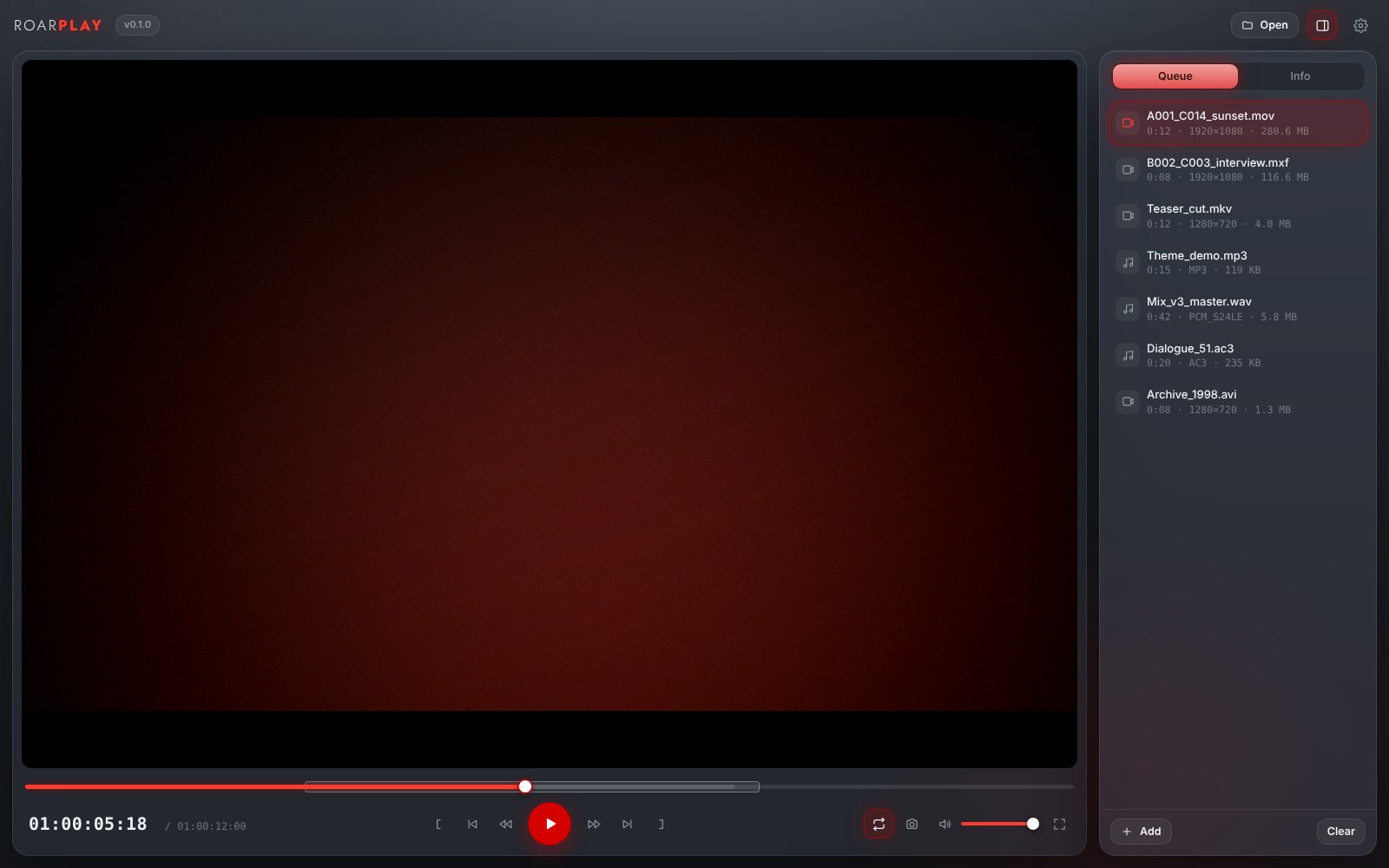
1frameLeft and right arrows step one frame; the clock shows exactly the frame on screen.
8×J and L, faster with each press, back and forward. K stops.
€0No subscription, no ads, no account.

01 · Only here

Three things only RoarPlay does.

Why the player that came with the computer is not enough when the file came from a camera.

01

Plays everything.

What the computer decodes itself plays as it is. Everything else is made playable while it plays, on your own computer, with nothing written to disk: a picture the computer knows in a wrapper it does not (H.264 in MKV, AVI, TS) is only re-wrapped; ProRes, DNxHR, MPEG-2 and the rest are made H.264 on the fly, with the Mac’s own encoder; sound the computer cannot play comes as FLAC, lossless. The Info tab says which.

As it isRe-wrappedH.264 on the flySound as FLAC
A001_C014.movProRes 422 HQ · 1080p25
Teaser_cut.mkvH.264 · AC3
Mix_v3_master.wav24-bit · 48 kHz
Dialogue_51.ac35.1
02

The edit suite’s clock and keys.

The timecode comes from the file itself, 01:00:00:00, drop-frame as 01:00:00;00, or time or frames. J, K and L as in Premiere, Resolve and Avid, faster with each press. The arrows step one frame, from the frame that is on screen, not from where the clock thinks it is. I and O mark in and out, / plays between them, Cmd+L loops.

TimecodeJ K LFrame by frameIn and out
Timecode01:00:05:18
JKL←→IO/
03

The frame, as a PNG.

Cmd+Shift+S saves the frame on screen at the file’s full size, next to the file, named with its timecode: a reference for the colourist, a still for the deck, a frame for the client, in one press. From the original, not from the screen.

Full sizeNamed by timecodeBeside the file
A001_C014 01-00-05-18.png1920 × 1080
A001_C014 01-00-07-02.png1920 × 1080
Cmd+Shift+SShow in Finder

02 · For the director

Made for watching work.

Dailies, a cut, a mix, an old archive: it opens and it tells you what it is.

Info

What the file is made of.

Wrapper, length, bitrate, timecode; the picture’s codec and profile (ProRes HQ, H.264 High), frame size, frame rate, colour, interlacing; the sound’s codec, sample rate, bit depth and channels; subtitles. And how RoarPlay is playing it.

Sound

Cover, waveform, every track.

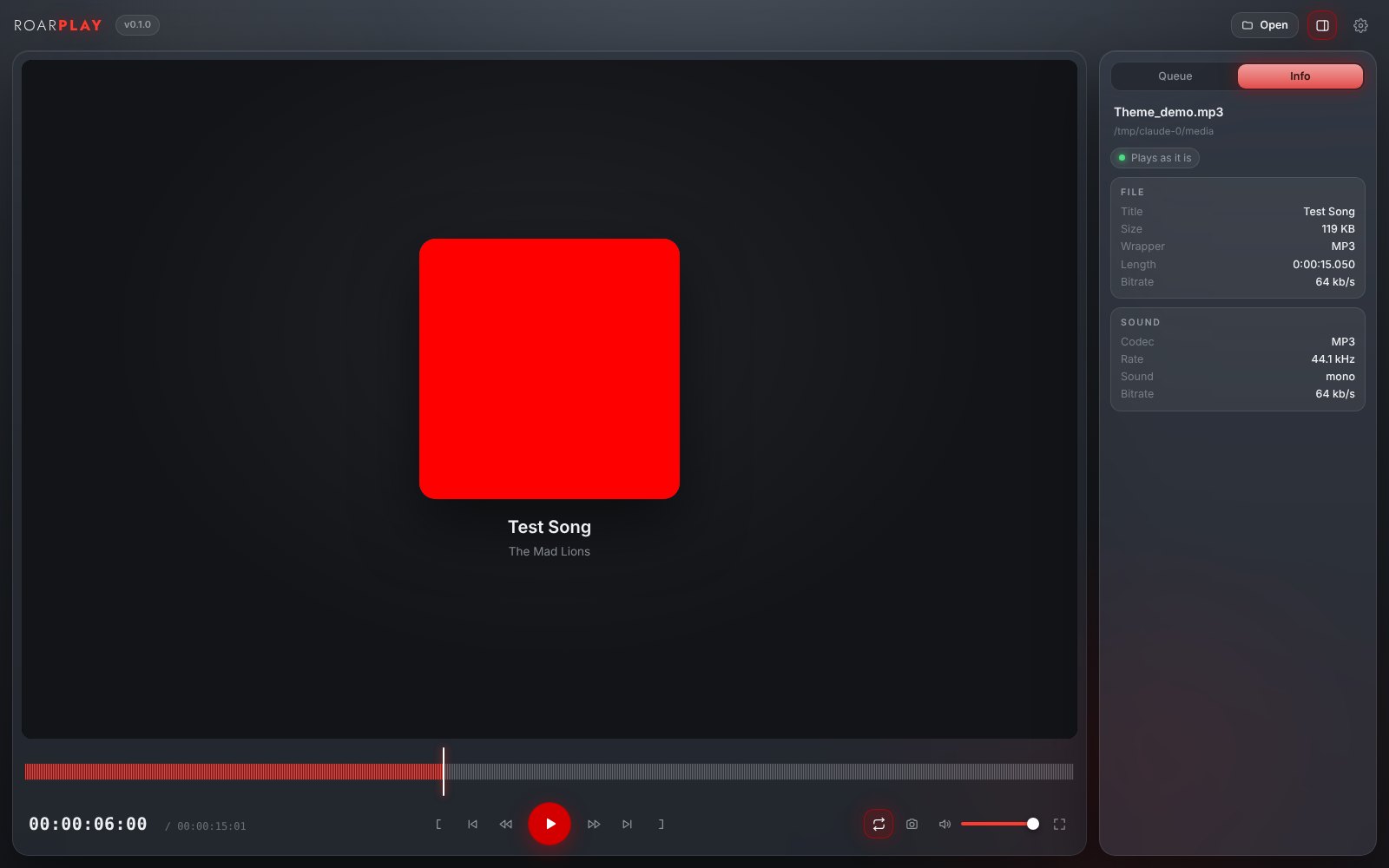
A sound file shows its cover, its title and artist, and a waveform you scrub. A film with several sound tracks, the Greek and the English, the mix and the M&E: choose one in Info and it switches where you are.

Queue

A folder in order.

Drop files or whole folders; they line up in name order, with length, size and frame. One ends, the next plays, or stops, or repeats. Cmd+← → jump between them.

Honest

Camera RAW: it tells you.

Blackmagic RAW, REDCODE, ARRIRAW, Canon RAW and N-RAW need their makers’ own tools. RoarPlay does not pretend: it names the file’s format and the app that opens it, so you are not left with a black window.

RoarPlay icon
RoarPlay playing a song: the cover, the waveform and the file's facts

03 · The player’s tools

Everything a player should have had.

Since 0.2: subtitles, speed, chapters, the picture and the sound in your hands, and a window that gets out of the way.

Subtitles

Inside the file or beside it.

The tracks inside an MKV, MOV or MP4 and any .srt, .ass, .vtt or .sub beside the file (Film.srt, Film.el.srt), or one you pick; three sizes, a delay in half seconds. S switches them.

Speed and chapters

0.25× to 4×, voices kept.

Slow a take down or race through an interview with the voices at their own pitch; [ and ] step the speed, \ brings it back. Chapters as ticks on the bar with their names, Page Up and Page Down between them.

Picture

Fit, fill, 2.39, zoom, turn.

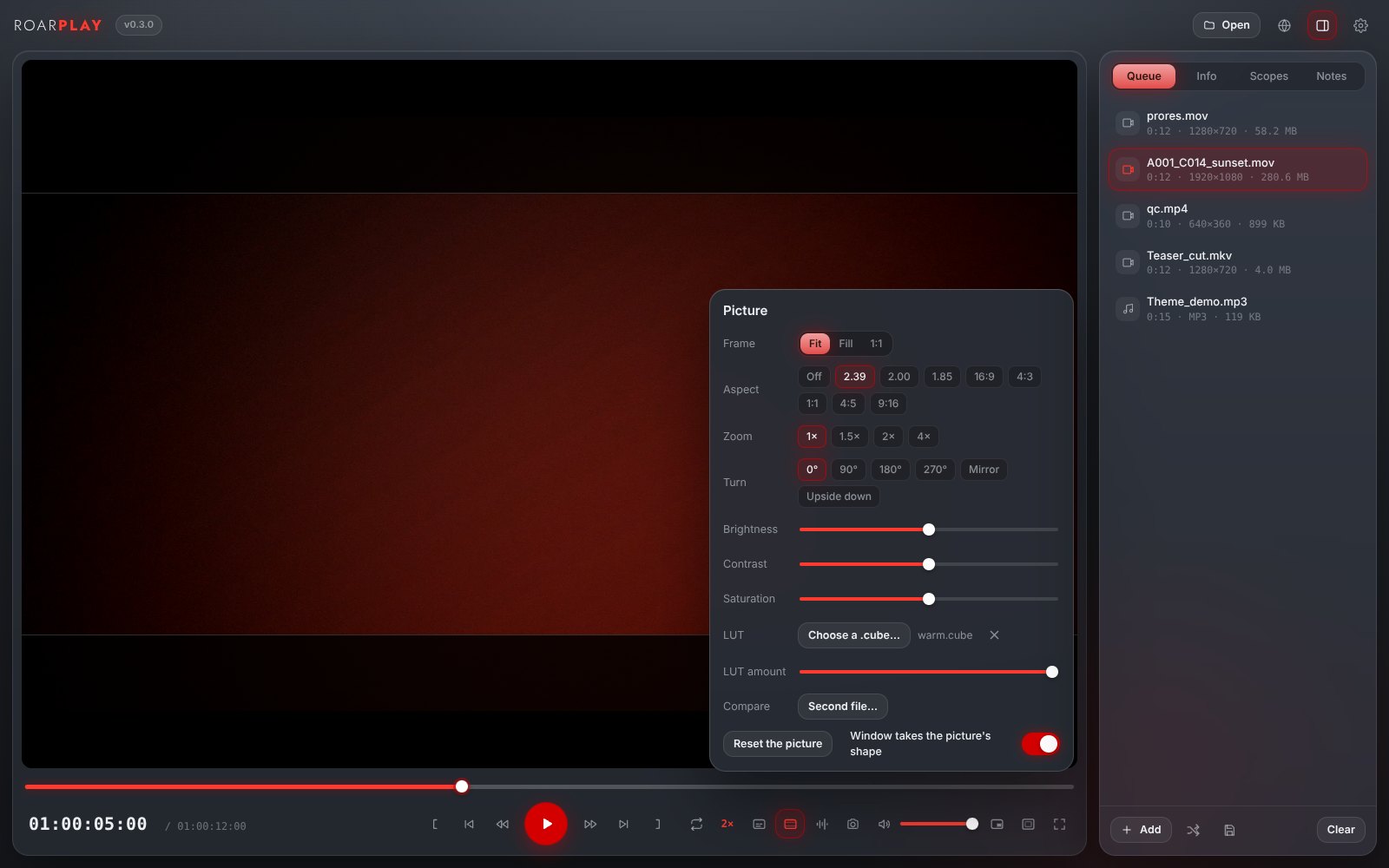
An aspect mask (2.39, 2.00, 1.85, 16:9, 4:3, 1:1, 4:5, 9:16) darkens what falls outside the frame without cutting; zoom to 4×; turn, mirror, upside down; brightness, contrast, saturation. The window takes the picture’s shape when a file opens.

Sound

What you hear, exactly.

The track; stereo, left only, right only, mono or swapped, and with 5.1 the centre alone or the surrounds alone; a delay in 50 ms steps; the output device; a ten-band equalizer with presets.

RoarPlay's Picture window: frame, aspect mask at 2.39, zoom, turn, brightness, contrast, saturation, a LUT and a second file to compare
01The small bezel

B: only the picture inside a thin frame, no bars; a small bar with play, the clock and Always on top comes when the mouse moves. P for picture in picture.

02In and out that clear with a click

The handles sit on the bar; a click on one clears it, the × beside them clears both.

03Info, all of it

Everything the file says: the wrapper and its tags, every stream with its flags and side data, chapters, dates, the whole ffmpeg report. Copy all puts it on the clipboard.

04The queue, kept

The list is there next time, with shuffle, and can be saved as M3U; M3U files open as a list. A file stopped in the middle opens there again.

05Thumbnails on the bar

Move over the bar and see the frame you are about to jump to.

06Open with RoarPlay

One switch in Settings makes RoarPlay the app for video or sound files; a double click in the Finder or the Explorer opens them here.

04 · The professional side

The finishing room’s instruments.

Since 0.3, in the Scopes and Notes tabs: what Switch, Kyno and OpenRV charge for, on your own computer.

01

Meters, loudness, scopes.

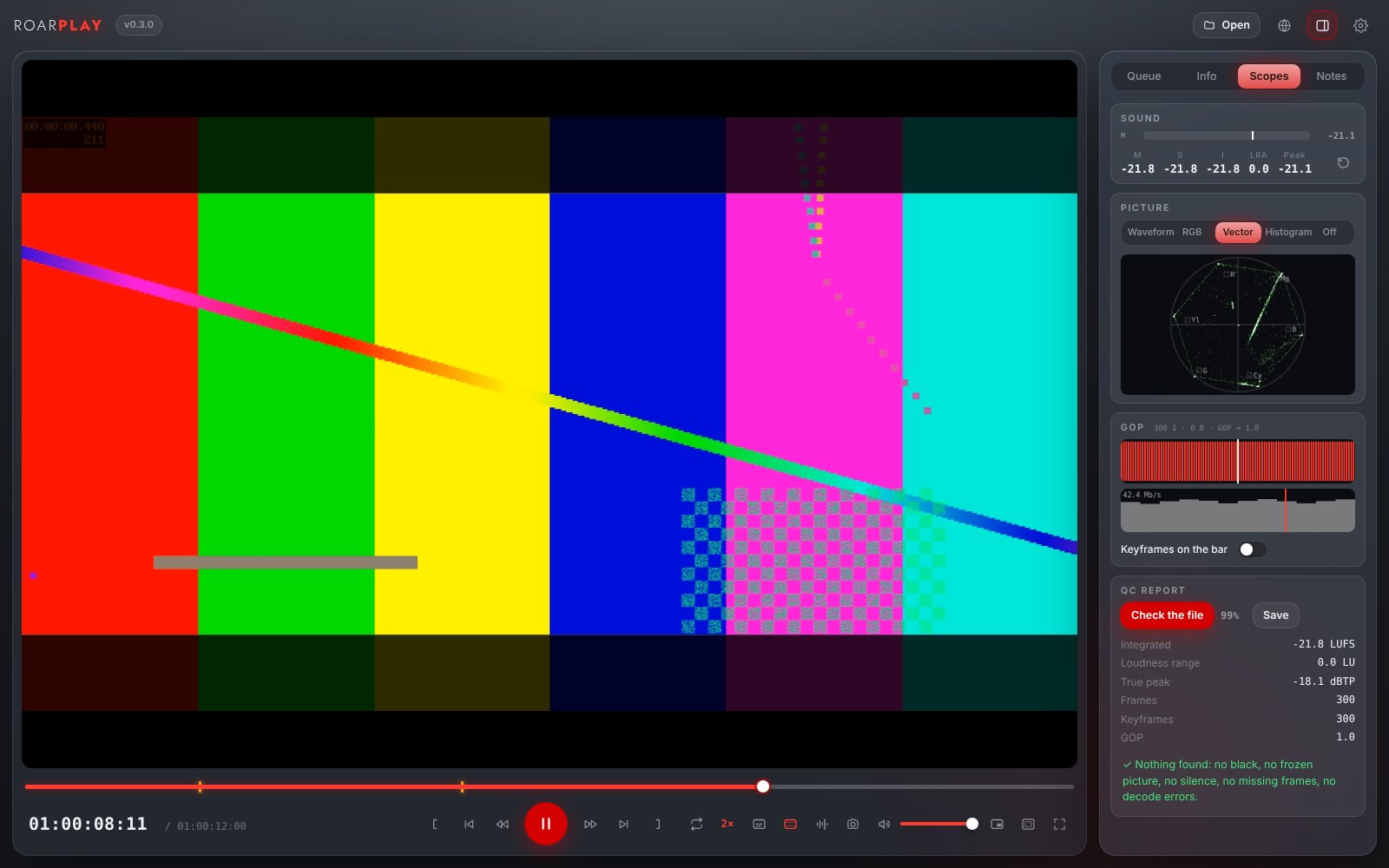
Meters per channel with a peak hold, and loudness as EBU R128 measures it: momentary, short-term, integrated, range and peak of what you hear. Of the picture on screen: luma waveform, RGB parade, vectorscope with the 75% targets, histogram.

EBU R128M · S · I · LRAWaveform · ParadeVectorscope · Histogram
M−21.8 LUFS
S−21.8 LUFS
I−21.8 LUFS
LRA0.0 LU
Peak−21.1 dBFS
02

GOP, bitrate, QC report.

The packets read once, no decoding: every frame around the playhead as I, P or B, the keyframes on the bar, the bitrate over the whole file. One pass over the file finds black stretches, frozen picture, silence, missing frames and decode errors, each with its time, and measures integrated loudness, range and true peak. Saved as text.

I · P · BKeyframes on the barBlack · Frozen · SilenceTrue peak
Integrated−21.8 LUFS
Loudness range0.0 LU
True peak−18.1 dBTP
Frames300
GOP12
Nothing found
03

LUT, compare, markers for Resolve.

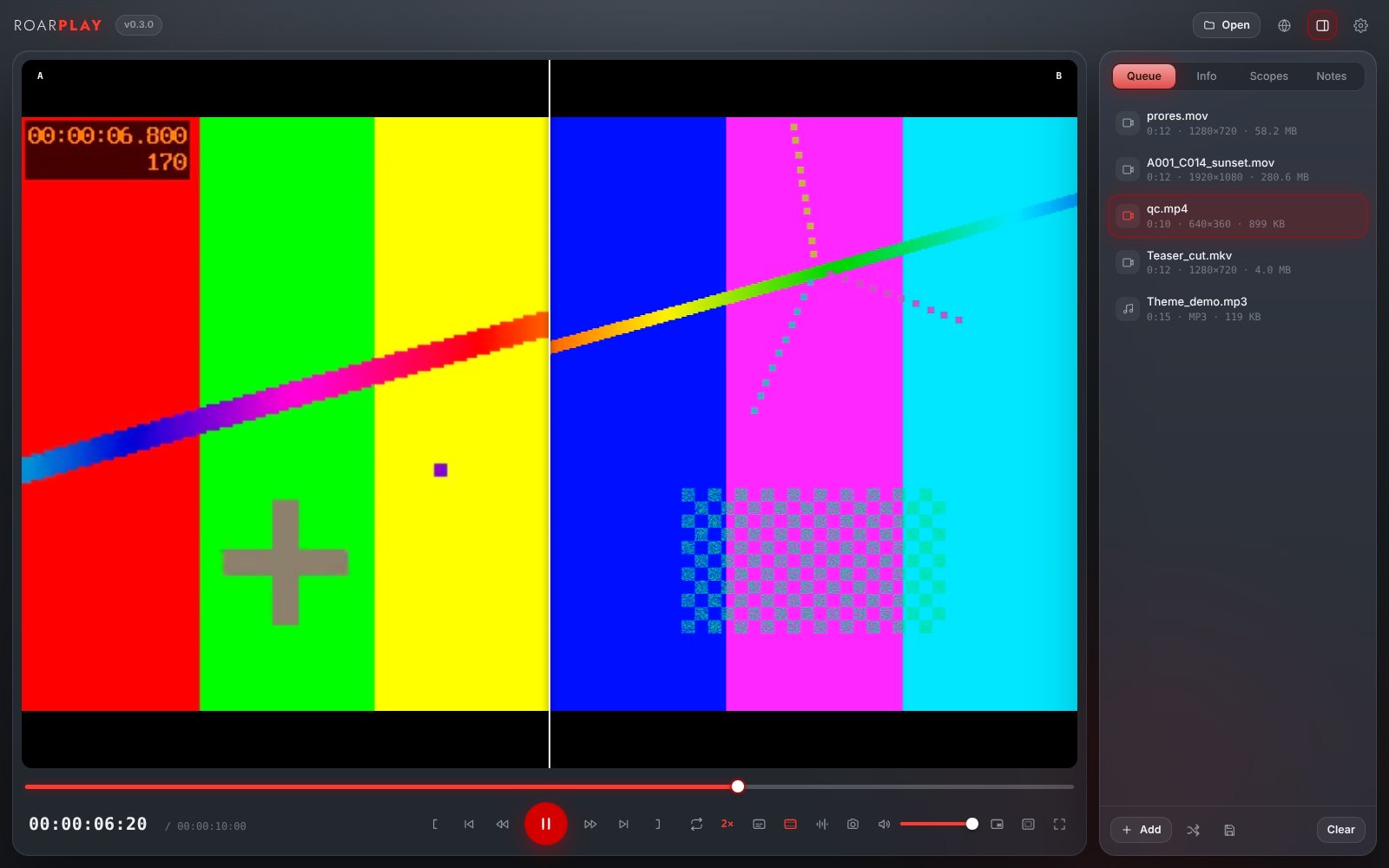
A .cube from Resolve or any grading tool on the picture, with an amount slider, through the GPU. A second file over the first, as a wipe you drag or side by side, locked to the clock, with an offset in frames. A rating from 1 to 5 and markers with a note (N at the frame on screen), saved as CSV or as an EDL that DaVinci Resolve imports as timeline markers.

.cubeWipe · Side by sideRating · MarkersCSV · EDL
A001_C014 markers.edl12 markers
A001_C014 notes.csv★★★★
Resolve › Import › Timeline markers
RoarPlay's Scopes tab: meters and EBU R128 loudness, the vectorscope of the picture, the GOP strip and bitrate, and a QC report that found nothing
RoarPlay comparing two files as a wipe, A on the left and B on the right, locked to the same clock

05 · Everything

And the rest.

RoarPlay, briefly.

01Video in

MP4, MOV, M4V, MKV, WebM, AVI, WMV, FLV, MPG, VOB, TS, MTS, M2TS, 3GP, OGV, MXF, DV, GIF and everything else ffmpeg reads.

02Codecs

H.264, HEVC, VP8, VP9, AV1, ProRes in every flavour, DNxHD and DNxHR, XDCAM, MPEG-1 and 2, MPEG-4, DV, MJPEG, Cinepak and the rest.

03VJ, LED walls, sequences, links

Resolume DXV (every quality, with or without alpha), HAP, NotchLC; image sequences of DPX, EXR, PNG, TIFF, JPEG or CinemaDNG frames as one clip at 24, 25 or 30 fps; a web address to a video or sound file (Cmd+U).

04Sound in

MP3, WAV and BWF, AIFF, FLAC, ALAC, AAC and M4A, Ogg, Opus, WMA, AC3, E-AC3, DTS, APE, WavPack, AMR, CAF and more.

05Nothing on disk

What is made playable on the fly goes straight to the window, piece by piece, at 1080p so it stays smooth on every computer (Settings › Full keeps the size). No temporary files, no cache folder to empty.

06Seek anywhere

Jump on the bar and a ProRes or MXF starts again from there in a moment; a jump inside what has already come is instant.

07Full screen

F or a double click; the controls hide when the mouse rests, and come back when it moves.

08Open with

Double-click a video or a sound file in the Finder or the Explorer, or drop it on the app, and RoarPlay opens it.

09Interlaced, 10-bit, 4:2:2

Old TV material is deinterlaced on the way; 10-bit and 4:2:2 pictures the computer cannot decode are made 8-bit 4:2:0 for the screen.

10The clock, three ways

Timecode, time to the millisecond, or a frame count; click the clock to switch, or set it in Settings.

11English and Greek

The app speaks both; choose in Settings.

12Updates itself

Looks every two hours, brings the new version in the background and puts it in when you close it; Check now and Restart to update in Settings.

13Every key, listed

Settings has the whole list: Space, J K L, the arrows, Home and End, I and O, /, M, F, Cmd+Shift+S.


06 · Why Roar

Why a Roar app.

What every app of The Mad Lions Lab promises, RoarPlay included.

On your computer

No account, no server, no upload. Unreleased footage stays with you, and no internet is needed.

The file stays

RoarPlay only reads. It writes nothing but the PNG you ask for, beside the file, never over it.

Updates itself

New versions come in the background and go in when you close it. Mac and Windows.

Made by filmmakers

The Mad Lions, a film company in Athens, watch their own dailies with it. Ideas go straight to the people who make it.

07 · Download

Get RoarPlay.

Free, and in beta: an experiment of The Mad Lions Lab that we use for our own dailies.

Mac

For Macs with Apple chips (M1 and newer). Download Older Mac with Intel? This one

Windows

Windows 10 and 11. Download

It updates itself. The Mac and Windows apps fetch new versions on their own and ask for a quick restart.

First time on a Mac? The app is not signed by Apple yet: right-click RoarPlay in Applications and choose Open, or press Open Anyway in System Settings › Privacy & Security. On Windows: More info › Run anyway.

08 · Questions

Good to know.

Is RoarPlay free?

Yes. No subscription, no ads, no account.

Does it really play ProRes and MXF on Windows?

Yes. What the computer cannot decode is made H.264 on the fly by the ffmpeg that comes with the app, on your computer, as it plays. On a Mac the Mac’s own video engine does it; on Windows the software encoder, which keeps up with 1080p and most 4K on a recent machine.

Is the picture I see the original?

H.264, HEVC, VP9 and AV1 in MP4, MOV, MKV or WebM play as they are. ProRes, DNxHR, MPEG-2 and the other edit codecs are re-encoded for the screen at a high quality, so judge colour and sharpness on the original in your grading tool; a frame saved with Cmd+Shift+S is taken from the original file.

Where does the timecode come from?

From the file: the timecode track of a MOV or MXF, or the timecode in its metadata. A file without one counts from 00:00:00:00. Drop-frame is shown with a semicolon, as the camera wrote it.

Does it play Blackmagic RAW or RED?

Not yet. Camera RAW needs the makers’ own tools; RoarPlay tells you which one opens the file. Transcode it to ProRes with RoarMorph or Resolve to play it here.

Is the loudness reading the real one?

The meters read what you hear, K-weighted and gated as EBU R128 says; in our tests the integrated reading matched ffmpeg’s to a tenth of a LU. The QC report measures the whole file once, with true peak. For a delivery, check against the broadcaster’s own tool too.

Where do the subtitles come from?

From inside the file (MKV, MOV, MP4 tracks) and from any .srt, .ass, .vtt or .sub beside it with the same name, or a file you pick. Bitmap subtitles (DVD, Blu-ray) are named but not shown.

Do I need the internet?

No. Only to download the app and its updates; everything else runs on your computer.

09 · New

What’s new.

Three versions in a day: 0.1 played everything, 0.2 brought the player’s tools, 0.3 the finishing room’s instruments.

Scopes, loudness, GOP, QC report

Meters per channel and EBU R128 loudness of what you hear; waveform, RGB parade, vectorscope and histogram of the picture; the GOP strip and the bitrate from the packets; a QC pass for black, frozen picture, silence, missing frames and decode errors, saved as text.

v0.3.0

LUT, compare, markers

A .cube on the picture with an amount; two files as a wipe or side by side; rating and markers saved as CSV or a Resolve EDL; 5.1 heard as centre or surrounds only.

v0.3.0

Subtitles, speed, chapters

Tracks inside the file and files beside it; 0.25× to 4× with the voices’ pitch kept; chapters on the bar.

v0.2.0

Picture and sound in your hands

Fit, fill, 1:1, aspect masks, zoom, turn, mirror, brightness, contrast, saturation; tracks, what you hear, delay, output device, a ten-band equalizer. The window takes the picture’s shape.

v0.2.0

The small bezel, the queue kept

B for only the picture, P for picture in picture, always on top; resume where you stopped; the list saved and as M3U; thumbnails on the bar; full Info with Copy all; DXV, HAP, NotchLC, image sequences, web links; Open with RoarPlay.

v0.2.0

Plays everything

What the computer knows plays as it is; what it does not is re-wrapped or made H.264 on the fly, sound as FLAC, on your computer, with nothing written to disk. ProRes, DNxHR, MXF, MKV, AVI, MPEG-2, WAV, FLAC, AC3, AIFF and the rest.

v0.1.0

Timecode, J K L, frames

The file’s own timecode, drop-frame too; J K L up to 8×; one frame with the arrows; in and out, loop, play between them.

v0.1.0

A frame as PNG

Cmd+Shift+S: the frame on screen, full size, from the original, beside the file, named by its timecode.

v0.1.0

Sound, with its waveform

Cover, title and artist, a waveform to scrub, and every sound track of a film to choose from.

v0.1.0

Contact

Ideas for the next version?

lab@themadlions.com