A GIF becomes a video
Drop a GIF and save it as MP4, MOV, ProRes or WebM, to post it anywhere or cut it in the edit. An odd size like 481×271 is made even, so H.264 takes it.
v0.3.1 ROARMORPH
Convert and compress · The Mad Lions Lab · Experiment 08
 ROARMORPHbeta
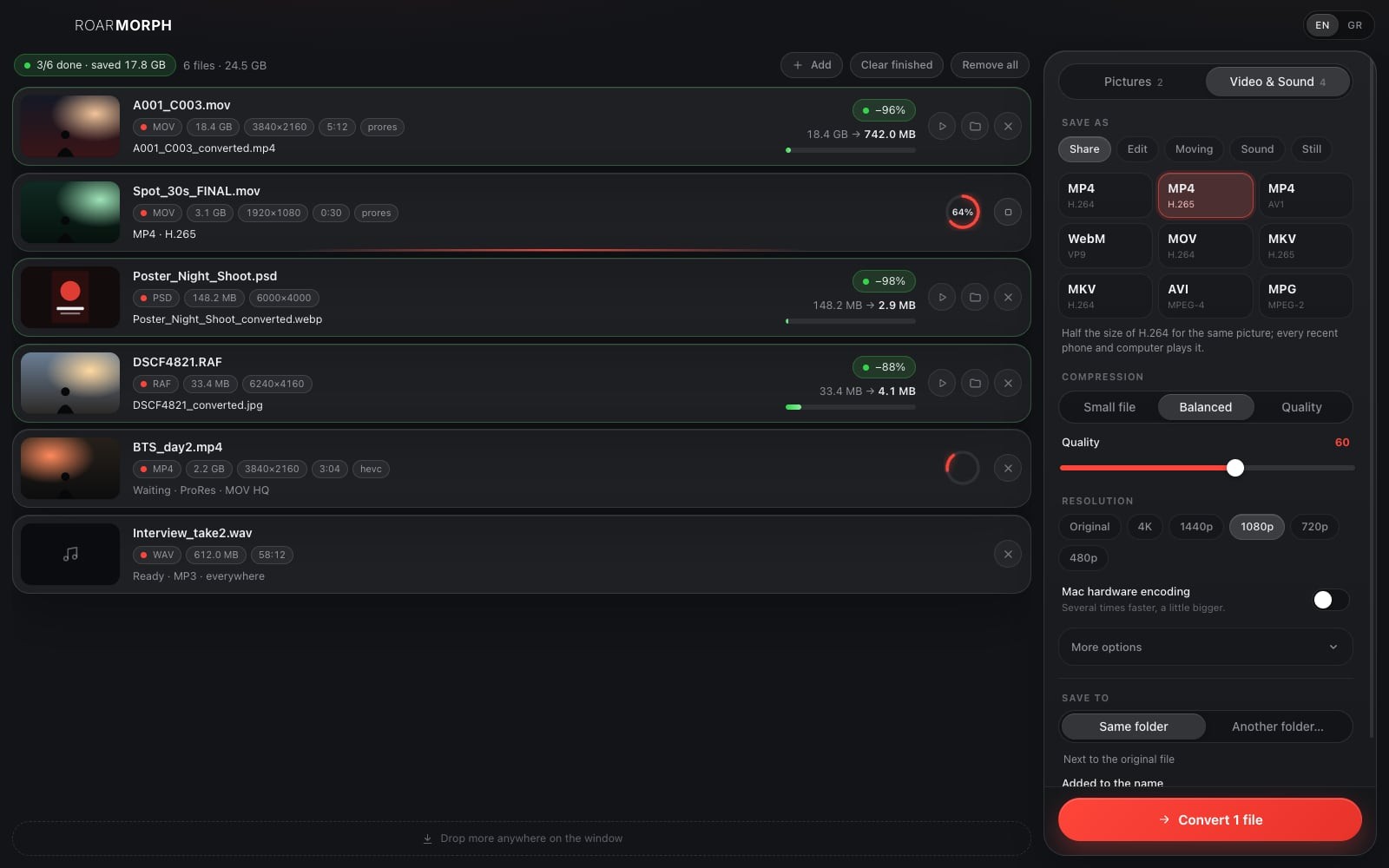
Every format, a smaller file. Pictures, videos and sound, converted and compressed on your own computer: drop them in, choose how small, and they are ready next to the originals.
Free · Mac and Windows · nothing is uploaded, the originals stay as they are
New
Since 0.1 in October: the formats for the edit, the look and the frame, the sound, sizes that land, and a GIF into a video.
Drop a GIF and save it as MP4, MOV, ProRes or WebM, to post it anywhere or cut it in the edit. An odd size like 481×271 is made even, so H.264 takes it.
v0.3.1Ask for 25 MB, or a bitrate in Mb/s as Resolve’s Restrict to, and turn on Two passes: in our tests a 1 MB target came out at 0.96 MB.
iPhone HLG and HDR10 clips are brought to Rec.709, only when the source is HDR. Add a LUT (.cube, .3dl, .dat, .csp) and every clip gets the look.
v0.3.0ProRes from Proxy to 4444 with alpha, DNxHR from LB to 444 in MOV or in MXF for Avid, XDCAM HD422 at 50 Mbit/s for broadcast, and FFV1 in MKV, lossless, for the archive.
On a Mac, H.264 and H.265 can use the Mac’s own encoder, several times faster; if it says no, the software one makes the same file.
16:9, 9:16, 1:1, 4:5 or 2.39:1, cropped or whole over its own blurred copy. Anamorphic is desqueezed on the way, 1.33× to 2×.
v0.3.0Loudness to −14 LUFS for the web, −16 for a podcast or −23 for TV (EBU R128), mono or stereo, 44.1 or 48 kHz.
v0.3.0Camera RAW, JPEG XL and a PDF’s first page open on a Mac through its own tools; PSD, EXR and DPX everywhere. HEIC can be saved on a Mac too.
v0.2.0
RoarMorph wears the Roar family’s new icon: graphite glass, thin red lines. The version shows next to the app’s name, so you always know which one you have.
v0.3.1 · v0.3.201 · Only here
Why a website that shrinks one file at a time is not enough for a shoot.
Type 25 MB, for an email, a festival form or Discord, and RoarMorph works out the bitrate from the video's length and leaves room for the sound; or give a bitrate in Mb/s. No trying three times to get under the limit.
Photos from the phone or the camera's RAW, the poster's PSD, the master, the BTS, the interview's sound: drop them all at once. Pictures, video for sharing or for the edit, sound only, a GIF from a clip or a clip from a GIF, or a single still at any moment.
No upload, no account, no queue on a server: unreleased footage stays with you. The original is never touched; the new file is saved next to it, or in a folder you choose.
02 · For the shoot
The card, the stills, the edit, the deliveries: all at once.
One file, a few, or a folder with everything inside: RoarMorph finds the pictures, videos and sound in it. Pictures go three at a time, videos one by one, with the progress of each.
Turn a 16:9 shot into a Reel, a post, a story or a scope frame: cropped, or whole with its own blurred copy behind. Or a size of your own, with bars where the shape differs. Anamorphic footage is desqueezed on the way, 1.33× to 2×.
One tap sets everything; or set the quality, the size, the frame rate, the codec and the speed yourself. RoarMorph remembers what you chose.
The phone's HEVC or a web download into ProRes (Proxy to 4444) or DNxHR (LB to 444) for the timeline, MXF for Avid, XDCAM for broadcast, FFV1 for a lossless archive, a still for the poster, the interview as 24-bit WAV for the mix.
03 · Everything
RoarMorph, briefly.
JPG, PNG, WebP, AVIF, HEIC, TIFF, GIF, BMP, SVG, PSD, EXR, DPX and more; on a Mac also camera RAW, JPEG XL and PDF.
JPG, PNG, WebP, AVIF, TIFF, GIF, BMP, ICO for an icon, and HEIC on a Mac.
MP4 in H.264, H.265 or AV1, WebM, MOV, MKV, AVI, MPG; for the edit ProRes, DNxHR, MXF, XDCAM and lossless FFV1.
Keep only a part of the clip: from 0:12 to 0:45, say.
One frame as JPG or PNG, at the moment you say.
MP3, M4A, WAV 16 or 24-bit, AIFF, ALAC, FLAC or OGG out of any video.
H.264 and H.265 with the Mac's own video engine, several times faster; if it says no, the software one makes the same file.
A LUT (.cube, .3dl, .dat, .csp) on every clip, and HDR from the iPhone (HLG) or HDR10 brought to Rec.709, so it does not look grey.
−14 LUFS for the web, −16 for a podcast, −23 for TV; mono or stereo; 44.1 or 48 kHz.
A new version downloads in the background; one tap to restart.
The app speaks both; choose at the top.
A clip into a GIF or an animated WebP with its own palette, and a GIF into MP4, MOV, ProRes or WebM.
Width × height, with bars where the shape differs, and a keyframe every N frames.
No subscription, no ads, no watermark.
04 · Private
RoarMorph only ever writes new files. It reads the originals and leaves them where they are.
Every conversion runs on your computer. No account, no server, nothing uploaded, no internet needed.
The new file gets its own name, _converted by default, and a number if that name is taken. Nothing is written over.
Stop one file or all of them; what was half made is left out.
Camera data and location are left out by default; one switch keeps them.
05 · Download
Free, and in beta: an experiment of The Mad Lions Lab that we use for our own deliveries.
It updates itself. The Mac and Windows apps fetch new versions on their own and ask for a quick restart.
First time on a Mac? The app is not signed by Apple yet: right-click RoarMorph in Applications and choose Open, or press Open Anyway in System Settings › Privacy & Security. On Windows: More info › Run anyway.
06 · Questions
Yes. No subscription, no ads, no watermark.
It depends on the file. A ProRes master to H.265 is often 90 to 97% smaller; a PNG to WebP 70 to 95%; a phone photo to JPG about 40%. Each file in the list shows how much it saved.
With Two passes, yes, just under it: in our tests a 1 MB target came out at 0.96 MB. One pass is faster and lands close. A bitrate in Mb/s works the same way, as Resolve’s “Restrict to”.
MP4 with H.264 plays everywhere; H.265 is about half the size and plays on every phone and recent computer. For pictures on a website, WebP or AVIF.
Yes on a Mac: HEIC from the iPhone and camera RAW (DNG, CR3, NEF, ARW, RAF and more) open through the Mac's own tools, and HEIC can be saved too. On Windows HEIC may not open and RAW not yet; convert those on a Mac.
Yes, since 0.3.1: a GIF counts as a moving picture, so it can become MP4, MOV, ProRes or WebM. An odd size like 481×271 is made even for H.264.
Because it is HDR (HLG). HDR to Rec.709 is on by default and works only when the source is HDR, so the new file looks right everywhere.
No. Only to download the app and its updates; every conversion runs on your computer.
Contact